


Businesses that receive work orders from property managers, facilities managers, builders and commercial clients often spend a significant amount of time transferring information from documents into their job-management system.
A work order may arrive by email or as an uploaded document. Someone in the office then needs to read it, identify the relevant information and manually create the corresponding job.
Auto Work Order is an AI-driven work order-management platform designed to streamline this process.
It allows businesses to email, upload, process and manage work order documents, then transfer the extracted information into ServiceM8.
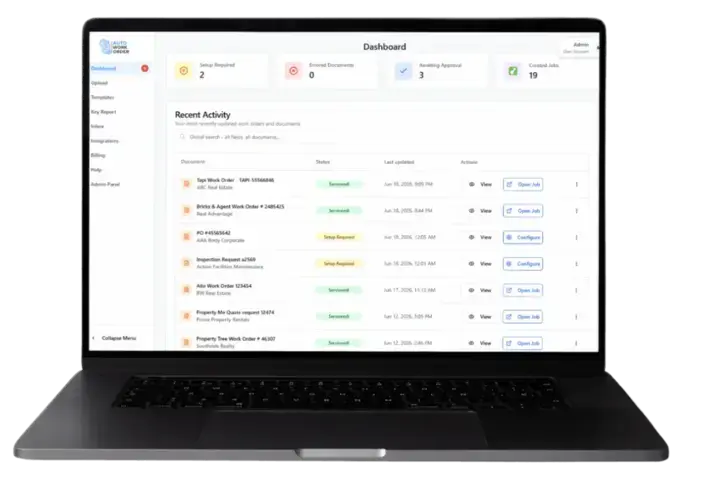
What Is Auto Work Order?
Auto Work Order is a document-processing platform that integrates with ServiceM8.
Its purpose is to reduce the manual work involved in taking information from an incoming work order and entering it into ServiceM8.
According to Auto Work Order, the platform can:
Receive work orders by email
Accept uploaded work order documents
Process and manage work order documents
Extract information using AI
Validate the extracted information
Map the information to the appropriate fields
Create a ServiceM8 job
Transfer the information into ServiceM8
Auto Work Order states that this processing can take approximately 15 to 30 seconds.
How the ServiceM8 Integration Works
The Auto Work Order process is built around converting information contained in a work order document into a ServiceM8 job.
The published workflow consists of four main stages.
1. Receive the work order
A work order can be emailed into Auto Work Order or uploaded directly to the platform.
This gives businesses a central place to process incoming work order documents rather than manually copying information from each document as it arrives.
2. Extract the information with AI
Auto Work Order uses AI to read the document and extract its data automatically.
This reduces the need for office staff to manually locate and retype the information contained in each work order.
3. Validate and map the data
Once the information has been extracted, Auto Work Order validates it and maps it to the relevant fields.
This step prepares the work order information for transfer into the connected job-management platform.
4. Create the ServiceM8 job
After processing and mapping the information, Auto Work Order creates the job in ServiceM8.
Auto Work Order describes this as an instant job-creation process with the work order data transferred into ServiceM8.
The Manual Work Order Process
Without an automated process, creating a ServiceM8 job from an external work order may involve:
Opening the email
Downloading or opening the attached document
Reading the work order
Identifying the customer and site
Finding the relevant instructions
Copying the information
Opening ServiceM8
Creating a new job
Entering the details into the appropriate fields
Checking the job against the original document
This can become repetitive for businesses receiving a high volume of work orders.
It also requires the person entering the job to continually move between the work order document and ServiceM8.
Auto Work Order is designed to automate more of that transfer process.
Key Benefits of Auto Work Order
Less manual data entry
The main benefit is reducing the amount of information office staff need to manually transfer from work order documents into ServiceM8.
Rather than retyping the document, the platform extracts and maps the information automatically.
Faster ServiceM8 job creation
Auto Work Order states that the processing workflow takes approximately 15 to 30 seconds and creates the ServiceM8 job directly.
For businesses processing many work orders, reducing the time required for each job may produce a significant administrative saving.
A more consistent process
Work orders can vary in layout and presentation.
Using one platform to receive, process, validate and map work order data can create a more structured process for handling incoming documents.
Reduced copying between systems
Manual work order entry often involves copying information from an email, PDF or other document into ServiceM8.
Auto Work Order is designed to handle that transfer through its integration, reducing the need to repeatedly switch between the original document and ServiceM8.
Centralised work order management
Auto Work Order does more than extract information. Its website also describes the platform as a place to email, upload, process and manage work order documents.
This gives businesses a dedicated workflow for handling incoming work orders before and during their transfer into ServiceM8.
Who Could Benefit from Auto Work Order?
Auto Work Order may be particularly relevant to ServiceM8 businesses that receive regular work order documents from external organisations.
This may include businesses completing work for:
Property managers
Facilities-management companies
Commercial customers
Builders
Maintenance coordinators
Organisations that issue formal work orders
The potential value increases as the volume of incoming work orders grows.
A business receiving an occasional work order may be comfortable entering it manually. A business receiving work orders every day may benefit more substantially from automating the extraction and ServiceM8 job-creation process.
Auto Work Order and ServiceM8
Auto Work Order does not replace ServiceM8.
ServiceM8 remains the job-management platform in which the resulting job is created and managed.
Auto Work Order sits before that stage of the workflow by processing the incoming document and transferring its information into ServiceM8.
The overall workflow is:
Work order received → document processed by Auto Work Order → information extracted and validated → fields mapped → ServiceM8 job created
This allows businesses to continue using ServiceM8 for their normal job-management processes while reducing the administration required to create jobs from external work orders.
Is Auto Work Order Right for Your Business?
Auto Work Order may be worth considering when:
Your business receives work orders by email
Staff regularly upload or download work order documents
Someone manually creates ServiceM8 jobs from those documents
Work order entry consumes a significant amount of office time
Your business processes a high volume of externally issued work orders
You want a more automated process between receiving a work order and creating the ServiceM8 job
The clearest way to assess its value is to consider how many work orders your business processes and how much time is currently spent entering each one.
Reduce the Administration Behind Every Work Order
Incoming work orders are necessary for many commercial and maintenance businesses, but manually transferring them into ServiceM8 does not need to remain a repetitive office task.
Auto Work Order uses AI to extract, validate and map work order data before creating the corresponding job in ServiceM8.
For businesses handling a regular volume of work order documents, this provides a way to reduce data entry, speed up job creation and create a more consistent work order-management process.
Learn More
Learn more about Auto Work Order and its ServiceM8 integration: Start a 14 day FREE trial today
Auto Work Order is an independent third-party platform that integrates with ServiceM8. Features, compatibility, subscription inclusions and pricing should be confirmed directly with Auto Work Order before subscribing.
Tradies Rescue is excited to introduce the Best Network Directory, a brand-new platform created to support and connect people in the ServiceM8 ecosystem.

Whether you're a ServiceM8 user, you offer tools that integrate with it, or you provide setup, support, or related services—this directory is for you. Our mission is to create a focused, trusted space where like-minded professionals can connect and grow together.
Please note: This platform is independent and is not affiliated with, endorsed by, or associated with ServiceM8. It’s a Tradies Rescue initiative designed to add value for users and supporters of the ServiceM8 platform.
What You’ll Find
A growing list of businesses and professionals who work within or around ServiceM8
Connections to reliable solutions, from CRMs and job management add-ons to trainers and consultants
A shared space for growth and networking, grounded in relevance and practicality
Why List Now?
The directory is still brand new—but it’s already attracting attention from people who genuinely want to be here. Right now, listings are free, but that won’t always be the case. A small annual fee will be introduced soon to support platform improvements, moderation, and hosting.
Joining early means:
Free exposure for your business
Early influence on how the directory grows
A head start in building your profile and presence in the community
Get Started
If you're part of the ServiceM8 world, this platform was created for you.
In today’s digital-first world, customer reviews are more than just feedback; they’re a cornerstone of your business’s reputation. Positive reviews build trust, drive sales, and set your business apart from the competition. But managing reviews can often feel like a daunting task. That’s where Get That Review steps in.
At Tradies Rescue, we recently had the pleasure of sitting down with the team at Get That Review to explore their innovative review software and its seamless integration with ServiceM8. Here’s what we learned about how it can help businesses like yours.
What is Get That Review?
Get That Review is a powerful yet straightforward platform designed to help businesses gather, manage, and showcase customer feedback. Whether you’re a sole trader or managing a growing team, the software simplifies the process of collecting reviews while boosting your online presence.
When integrated with ServiceM8, it becomes even more efficient, fitting seamlessly into your existing workflows to ensure your customers’ voices are heard.
Why Reviews Matter
Customer reviews are an invaluable tool for building trust with potential clients. A strong collection of reviews not only enhances credibility but also improves visibility in local search results. Reviews are often the deciding factor for customers choosing between you and your competitors.
An Exclusive Offer for Tradies Rescue Followers
To help you experience the benefits of Get That Review, we’re excited to share an exclusive deal for our community:
A 60-day free trial (instead of the standard 14 days)
1,000 email credits to help you reach your customers
No credit card required
This extended trial gives you the opportunity to see how Get That Review can transform your business’s online reputation. Whether you’re new to review platforms or looking for a better solution, this is your chance to dive in and explore the possibilities.
How to Claim Your Free Trial
Getting started is easy. Simply email info@getthatreview.com.au and mention "Tradies Rescue" to unlock this special offer. With no strings attached, you can focus on discovering how the platform works for you without any upfront commitment.
Why We’re Excited
At Tradies Rescue, we’re always on the lookout for tools that help tradies and small businesses succeed. Get That Review stands out for its ease of use, reliable results, and smart integration with ServiceM8. It’s a solution designed with your business in mind, giving you more time to focus on what you do best.
Start Building Your Reputation Today
Your reviews tell the story of your business. With Get That Review, you can take control of that narrative and make sure your hard work gets the recognition it deserves. Don’t miss this opportunity to trial the platform with our exclusive offer. Reach out to info@getthatreview.com.au today and mention "Tradies Rescue" to get started.
If you’ve used a review platform before or are currently using one, we’d love to hear your thoughts in the comments. Let’s keep the conversation going about how to make the most of customer feedback!


