


Manage Real Estate Jobs With Ease
Businesses that receive work orders from property managers, facilities managers, builders and commercial clients often spend a significant amount of time transferring information from documents into their job-management system.
A work order may arrive by email or as an uploaded document. Someone in the office then needs to read it, identify the relevant information and manually create the corresponding job.
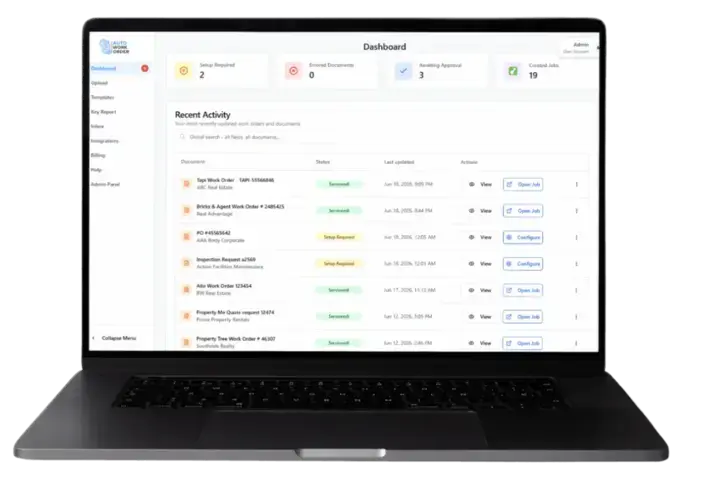
Auto Work Order is an AI-driven work order-management platform designed to streamline this process.
It allows businesses to email, upload, process and manage work order documents, then transfer the extracted information into ServiceM8.
What Is Auto Work Order?
Auto Work Order is a document-processing platform that integrates with ServiceM8.
Its purpose is to reduce the manual work involved in taking information from an incoming work order and entering it into ServiceM8.
According to Auto Work Order, the platform can:
Receive work orders by email
Accept uploaded work order documents
Process and manage work order documents
Extract information using AI
Validate the extracted information
Map the information to the appropriate fields
Create a ServiceM8 job
Transfer the information into ServiceM8
Auto Work Order states that this processing can take approximately 15 to 30 seconds.
How the ServiceM8 Integration Works
The Auto Work Order process is built around converting information contained in a work order document into a ServiceM8 job.
The published workflow consists of four main stages.
1. Receive the work order
A work order can be emailed into Auto Work Order or uploaded directly to the platform.
This gives businesses a central place to process incoming work order documents rather than manually copying information from each document as it arrives.
2. Extract the information with AI
Auto Work Order uses AI to read the document and extract its data automatically.
This reduces the need for office staff to manually locate and retype the information contained in each work order.
3. Validate and map the data
Once the information has been extracted, Auto Work Order validates it and maps it to the relevant fields.
This step prepares the work order information for transfer into the connected job-management platform.
4. Create the ServiceM8 job
After processing and mapping the information, Auto Work Order creates the job in ServiceM8.
Auto Work Order describes this as an instant job-creation process with the work order data transferred into ServiceM8.
The Manual Work Order Process
Without an automated process, creating a ServiceM8 job from an external work order may involve:
Opening the email
Downloading or opening the attached document
Reading the work order
Identifying the customer and site
Finding the relevant instructions
Copying the information
Opening ServiceM8
Creating a new job
Entering the details into the appropriate fields
Checking the job against the original document
This can become repetitive for businesses receiving a high volume of work orders.
It also requires the person entering the job to continually move between the work order document and ServiceM8.
Auto Work Order is designed to automate more of that transfer process.
Key Benefits of Auto Work Order
Less manual data entry
The main benefit is reducing the amount of information office staff need to manually transfer from work order documents into ServiceM8.
Rather than retyping the document, the platform extracts and maps the information automatically.
Faster ServiceM8 job creation
Auto Work Order states that the processing workflow takes approximately 15 to 30 seconds and creates the ServiceM8 job directly.
For businesses processing many work orders, reducing the time required for each job may produce a significant administrative saving.
A more consistent process
Work orders can vary in layout and presentation.
Using one platform to receive, process, validate and map work order data can create a more structured process for handling incoming documents.
Reduced copying between systems
Manual work order entry often involves copying information from an email, PDF or other document into ServiceM8.
Auto Work Order is designed to handle that transfer through its integration, reducing the need to repeatedly switch between the original document and ServiceM8.
Centralised work order management
Auto Work Order does more than extract information. Its website also describes the platform as a place to email, upload, process and manage work order documents.
This gives businesses a dedicated workflow for handling incoming work orders before and during their transfer into ServiceM8.
Who Could Benefit from Auto Work Order?
Auto Work Order may be particularly relevant to ServiceM8 businesses that receive regular work order documents from external organisations.
This may include businesses completing work for:
Property managers
Facilities-management companies
Commercial customers
Builders
Maintenance coordinators
Organisations that issue formal work orders
The potential value increases as the volume of incoming work orders grows.
A business receiving an occasional work order may be comfortable entering it manually. A business receiving work orders every day may benefit more substantially from automating the extraction and ServiceM8 job-creation process.
Auto Work Order and ServiceM8
Auto Work Order does not replace ServiceM8.
ServiceM8 remains the job-management platform in which the resulting job is created and managed.
Auto Work Order sits before that stage of the workflow by processing the incoming document and transferring its information into ServiceM8.
The overall workflow is:
Work order received → document processed by Auto Work Order → information extracted and validated → fields mapped → ServiceM8 job created
This allows businesses to continue using ServiceM8 for their normal job-management processes while reducing the administration required to create jobs from external work orders.
Is Auto Work Order Right for Your Business?
Auto Work Order may be worth considering when:
Your business receives work orders by email
Staff regularly upload or download work order documents
Someone manually creates ServiceM8 jobs from those documents
Work order entry consumes a significant amount of office time
Your business processes a high volume of externally issued work orders
You want a more automated process between receiving a work order and creating the ServiceM8 job
The clearest way to assess its value is to consider how many work orders your business processes and how much time is currently spent entering each one.
Reduce the Administration Behind Every Work Order
Incoming work orders are necessary for many commercial and maintenance businesses, but manually transferring them into ServiceM8 does not need to remain a repetitive office task.
Auto Work Order uses AI to extract, validate and map work order data before creating the corresponding job in ServiceM8.
For businesses handling a regular volume of work order documents, this provides a way to reduce data entry, speed up job creation and create a more consistent work order-management process.
Learn More
Learn more about Auto Work Order and its ServiceM8 integration: Start a 14 day FREE trial today
Auto Work Order is an independent third-party platform that integrates with ServiceM8. Features, compatibility, subscription inclusions and pricing should be confirmed directly with Auto Work Order before subscribing.


Comments